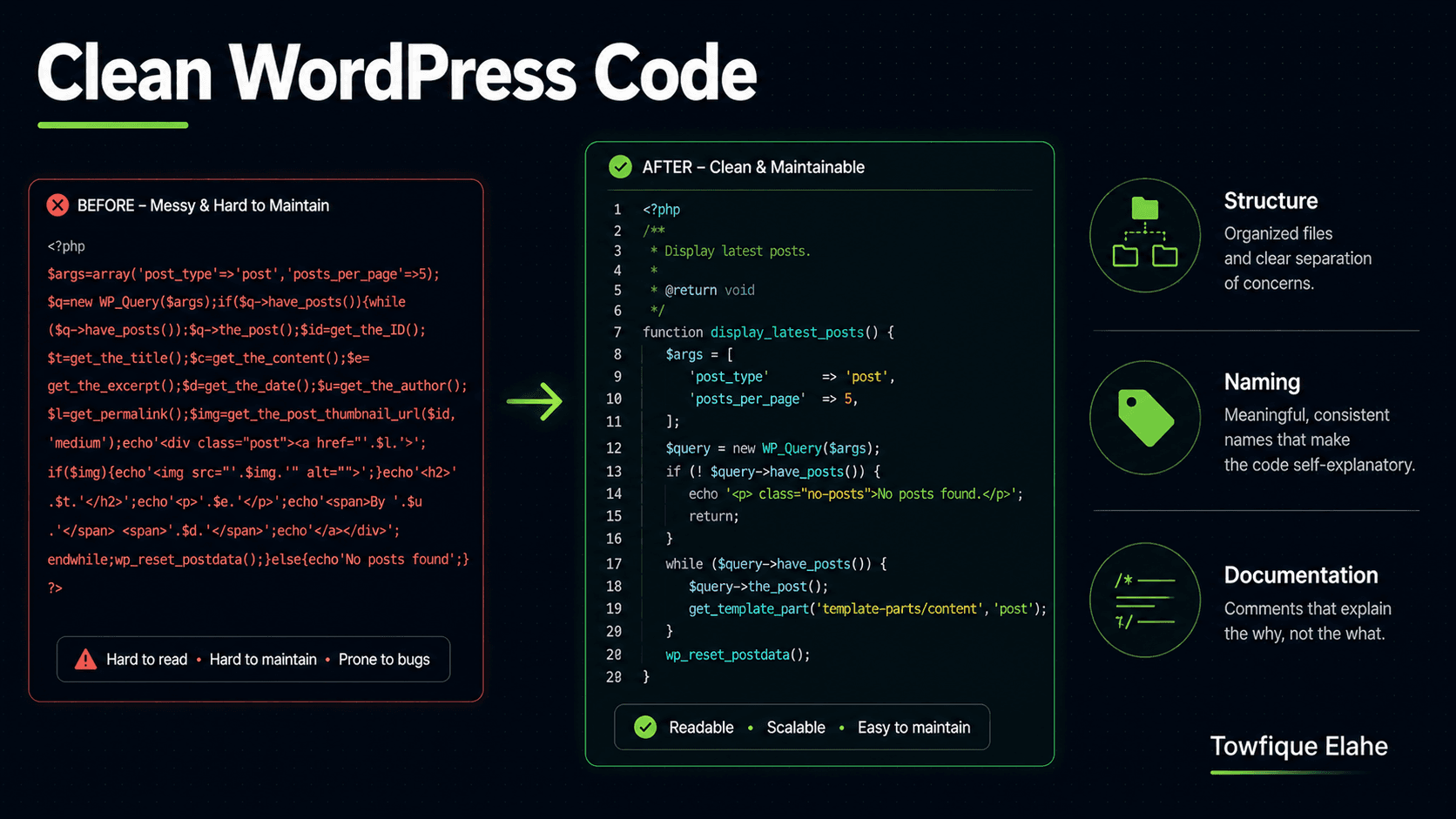
How to Write Clean, Maintainable WordPress Code
The code you write today is code someone maintains tomorrow — often future you, with no memory of why you did what you did. Learn the coding standards, structure, naming, and documentation habits that make WordPress projects clean, maintainable, and a pleasure to hand off or return to months later.
Why Clean Code Matters in WordPress
WordPress makes it easy to write code that works — and just as easy to write code that becomes a nightmare to maintain. Because the platform is so forgiving, functions get dumped into functions.php, logic gets tangled with markup, and naming is an afterthought. It all works fine, until six months later when you (or another developer) have to change something and can't understand your own project.
Clean code isn't about showing off or over-engineering. It's about writing code that's easy to read, easy to change, and easy to hand off. On client projects especially, maintainability is a professional obligation — the difference between a codebase that's a pleasure to work with and one that's a liability.
This guide covers the practical habits that make WordPress code clean: standards, structure, naming, documentation, and the mindset behind them.
1. Follow the WordPress Coding Standards
WordPress has official coding standards for PHP, JavaScript, CSS, and HTML. They exist so that any WordPress developer can read any other's code without friction. Following them isn't pedantry — it's what makes your code recognizable to the entire ecosystem.
The essentials for PHP:
- Use proper spacing: spaces inside parentheses for logic —
if ( $condition ), notif($condition). - Use tabs for indentation, not spaces.
- Always use braces, even for single-line statements.
- Use meaningful, lowercase function names with underscores:
get_featured_projects(), notgetFeaturedProjects()orgfp().
// Follows WordPress standards
function orbit_get_recent_posts( $count = 5 ) {
    $query = new WP_Query( array(
        'post_type'      => 'post',
        'posts_per_page' => $count,
    ) );

    return $query->posts;
}
You don't have to memorize every rule — tools like PHP_CodeSniffer with the WordPress Coding Standards ruleset can check your code automatically and even fix many issues.
2. Always Prefix Everything
WordPress runs all themes and plugins in the same global namespace. If your function is named get_projects() and a plugin defines the same name, the site crashes with a fatal error. Prefixing is not optional — it's how you prevent collisions.
Choose a unique prefix for the project and apply it consistently to functions, classes, constants, global variables, and option keys:
// Prefixed — safe
function orbit_register_widgets() { }
define( 'ORBIT_THEME_VERSION', '1.0.0' );
$orbit_settings = get_option( 'orbit_settings' );

class Orbit_Project_Manager { }
For modern PHP, wrapping code in a proper namespace or class is even cleaner — but at minimum, prefix everything. A distinctive 4–6 character prefix tied to the project or brand works well.
3. Separate Logic from Presentation
One of the most common WordPress messes is mixing PHP logic directly into template markup — database queries, calculations, and business logic tangled up with HTML. This makes both the logic and the markup harder to read and change.
Keep data-fetching logic separate from the templates that display it. Compute and prepare data first, then output clean markup:
// Bad — logic tangled with markup
<div class="projects">
<?php
$q = new WP_Query( array( 'post_type' => 'project', 'meta_key' => 'featured', 'meta_value' => '1' ) );
while ( $q->have_posts() ) { $q->the_post();
echo '<h3>' . get_the_title() . '</h3>'; }
?>
</div>

// Better — logic prepared separately, markup stays clean
<?php $projects = orbit_get_featured_projects(); ?>

<div class="projects">
    <?php foreach ( $projects as $project ) : ?>
        <h3><?php echo esc_html( $project['title'] ); ?></h3>
    <?php endforeach; ?>
</div>
The template now reads clearly as a display layer, and the query logic lives in a reusable, testable function elsewhere.
4. Organize Files with a Clear Structure
A theme or plugin where everything lives in one giant functions.php becomes unmanageable fast. Split functionality into logical, well-named files and include them from a single entry point:
your-theme/
├── functions.php          (just loads the includes)
├── inc/
│   ├── setup.php          (theme supports, menus, sidebars)
│   ├── enqueue.php        (scripts and styles)
│   ├── post-types.php     (CPT registrations)
│   ├── taxonomies.php     (taxonomy registrations)
│   ├── metaboxes.php      (custom fields)
│   ├── helpers.php        (reusable utility functions)
│   └── ajax.php           (AJAX handlers)
├── template-parts/        (reusable template pieces)
Then functions.php stays clean and readable — it's just a manifest:
$includes = array(
    'setup', 'enqueue', 'post-types',
    'taxonomies', 'metaboxes', 'helpers', 'ajax',
);

foreach ( $includes as $file ) {
    require_once get_template_directory() . '/inc/' . $file . '.php';
}
Now anyone opening the project can immediately understand its architecture and knows exactly where to find any piece of functionality.
5. Name Things for Humans
Good naming is one of the highest-impact clean-code habits. A well-named function or variable documents itself — you understand what it does without reading its body or a comment.
- Be descriptive:
$featured_projects, not$fpor$data. - Functions are verbs:
orbit_get_project_count(),orbit_render_gallery()— they describe an action. - Booleans read as questions:
$is_featured,$has_thumbnail,orbit_is_project_live(). - Avoid abbreviations that only make sense to you today.
The extra keystrokes cost nothing and save enormous confusion later. Code is read far more often than it's written — optimize for the reader.
6. Write Comments That Explain "Why," Not "What"
Good code shows what it does through clear naming and structure. Comments should explain the why — the reasoning, the edge case, the non-obvious decision that the code itself can't convey.
// Bad — states the obvious
// Loop through the projects
foreach ( $projects as $project ) { }

// Good — explains a non-obvious decision
// We cache for 12 hours because project data rarely changes,
// but invalidate on save_post so edits appear immediately.
set_transient( 'orbit_projects', $projects, 12 * HOUR_IN_SECONDS );
For functions, use PHPDoc blocks to document parameters and return values. This gives editors autocomplete support and makes the function's contract clear at a glance:
/**
 * Retrieve featured projects, cached for performance.
 *
 * @param int $count Number of projects to return. Default 6.
 * @return array Array of project data arrays.
 */
function orbit_get_featured_projects( $count = 6 ) {
    // ...
}
7. Don't Repeat Yourself (DRY)
When you find yourself copying and pasting the same block of code, that's a signal to extract it into a reusable function. Duplicated logic means that when something needs to change, you have to change it in multiple places — and you'll inevitably miss one.
// Repeated in multiple templates — fragile
$img = get_the_post_thumbnail_url( get_the_ID(), 'medium_large' );
if ( ! $img ) { $img = get_template_directory_uri() . '/images/placeholder.jpg'; }

// Extracted once — reused everywhere
function orbit_get_thumbnail( $post_id, $size = 'medium_large' ) {
    $img = get_the_post_thumbnail_url( $post_id, $size );
    return $img ? $img : get_template_directory_uri() . '/images/placeholder.jpg';
}
Now the fallback logic lives in exactly one place. Change it once, and every template benefits. This is the essence of maintainable code — a single source of truth for each piece of logic.
8. Always Escape Output and Sanitize Input
Clean WordPress code is also secure code. Two habits should be automatic: sanitize data coming in, and escape data going out. This isn't just security — consistent escaping also makes your code's data flow predictable and readable.
// Sanitize input
$search = sanitize_text_field( $_GET['search'] );
$email  = sanitize_email( $_POST['email'] );
$count  = absint( $_POST['count'] );

// Escape output based on context
echo esc_html( $title );              // plain text
echo esc_url( $link );                // URLs
echo esc_attr( $css_class );          // HTML attributes
echo wp_kses_post( $rich_content );   // content with allowed HTML
Make escaping a reflex on every single output. It should feel wrong to echo a variable without wrapping it in the appropriate escaping function.
9. Use WordPress APIs Instead of Reinventing Them
WordPress provides robust APIs for almost everything — settings, options, HTTP requests, database queries, transients, the REST API. Using them instead of writing your own means less code, fewer bugs, and better compatibility.
- Use
wp_remote_get()for HTTP requests, not raw cURL. - Use
WP_Queryfor queries, not direct$wpdbcalls unless truly necessary. - Use the Settings API for options pages rather than handling form submissions manually.
- Use
wp_enqueue_script()andwp_enqueue_style()for assets, never hardcoded tags.
The platform has already solved these problems, handled the edge cases, and secured the code. Leaning on its APIs keeps your codebase smaller and more reliable.
10. Keep Functions Small and Focused
A function should do one thing. When a function grows to hundreds of lines handling multiple responsibilities, it becomes hard to understand, test, and reuse. Break large functions into smaller, single-purpose ones.
If you can't describe what a function does in one short sentence without using "and," it's probably doing too much. A function called orbit_process_and_email_and_log_order() should almost certainly be three functions. Small, focused functions compose together cleanly and make the overall logic far easier to follow.
The Boy Scout Rule
There's a simple principle that keeps codebases healthy over time: leave the code a little cleaner than you found it. Every time you touch a file to fix a bug or add a feature, make one small improvement — rename an unclear variable, add a missing comment, extract a duplicated block.
You don't have to refactor everything at once. These tiny, continuous improvements compound. Over months, a codebase maintained this way stays clean and pleasant to work in, instead of slowly decaying into the tangled mess that most long-lived projects become.
Final Thoughts
Clean, maintainable WordPress code comes down to a handful of consistent habits: follow the coding standards, prefix everything, separate logic from presentation, organize files sensibly, name things clearly, comment the "why," stay DRY, and always escape and sanitize. None of these are difficult — they're just disciplines applied consistently.
The payoff is enormous. Clean code is faster to debug, easier to extend, and far less stressful to hand off to a client or another developer. And the person who benefits most is usually future you — returning to a project months later and finding code that still makes sense. Write for that person.
In the next post, we'll put these principles into practice by building a small, well-structured custom WordPress plugin from scratch — applying clean code habits, proper file organization, and WordPress APIs to create something maintainable from the first line.